
How Does IMEI Tracking Work? A Complete Guide to IMEI and Lost Phones
Byadmin
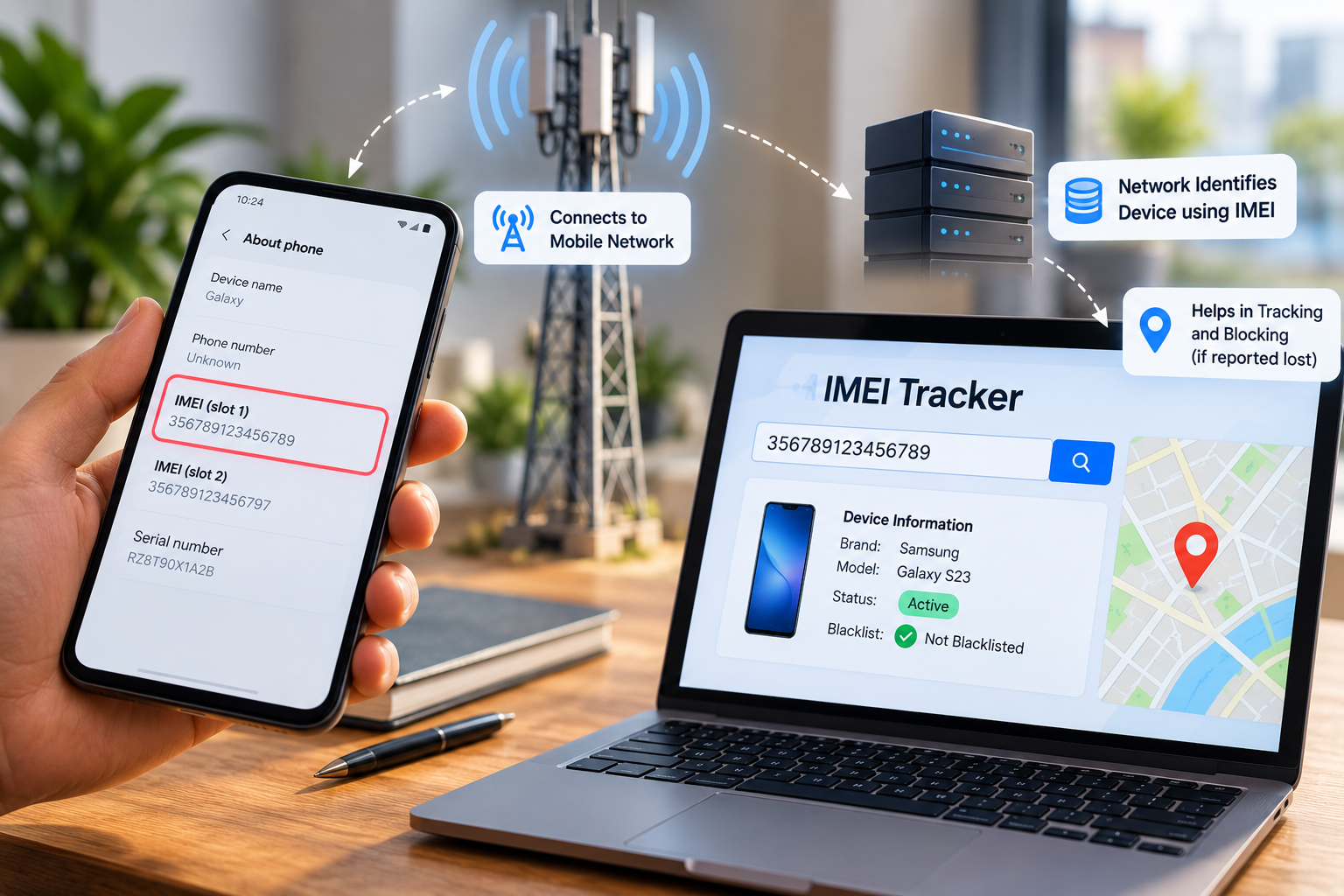
Losing a smartphone can be stressful, especially when it contains personal photos, banking apps, contacts, work information, and other important data. One of the first things many people search for is whether they can imei track phone and find its location.
The answer is more complicated than many websites make it sound.
An IMEI, or International Mobile Equipment Identity, is primarily a device identifier used by cellular networks. GSMA describes the IMEI as a 15-digit identifier associated with an individual mobile device. It helps network operators recognize devices and manage their status on cellular networks.
However, entering an IMEI number into a random website does not normally give a consumer the phone's live GPS position. Actual location services generally rely on technologies and services such as GPS, Wi-Fi, cellular positioning, Bluetooth-based finding networks, and account-linked device-finding systems.
So, how does IMEI tracking actually work?
The key is understanding the difference between identifying a device and locating a device. Once you understand that distinction, it becomes much easier to understand what an IMEI can and cannot do.
What Is an IMEI Number?
IMEI stands for International Mobile Equipment Identity.
It is a device identifier associated with cellular equipment. GSMA states that an IMEI is 15 digits long and is used to uniquely identify an individual device.
An IMEI is different from your mobile phone number.
Your phone number is associated with your subscriber or mobile service. Your IMEI identifies the cellular device itself.
For example, if you remove your SIM card and put it into another compatible phone, your phone number can move to the new device. The IMEI does not move with the SIM.
This distinction becomes particularly important when a phone is lost or stolen.
What Information Is Inside an IMEI?
The IMEI structure contains information used to identify the device.
GSMA explains that an IMEI includes components such as the Type Allocation Code (TAC), a serial number, and a check digit. The TAC identifies the device model type associated with the allocation.
An IMEI can therefore be useful for:
Identifying a cellular device
Checking device status
Supporting lost or stolen device reports
Network equipment management
Device authentication and blocking
Checking whether a device has been blacklisted
Helping identify a device during investigations
It is not, however, a GPS coordinate.
How Does IMEI Tracking Work?
The phrase imei track phone can create the impression that the IMEI itself constantly broadcasts a location. That's not how the technology works.
The IMEI is transmitted as part of cellular network interactions, allowing the network to identify the equipment connecting to it.
A simplified process looks like this:
Phone → Cellular Network → Device Identification → Network Records → Carrier/Authorized Systems
When a cellular device connects to a mobile network, the operator can associate network activity with the device identifier and subscriber/network information available to it.
If a device has been reported lost or stolen, network operators can use the IMEI to help identify and block that device from receiving cellular service.
This is why IMEI technology is particularly useful for device management and blocking, rather than functioning as a consumer-facing GPS tracker.
IMEI Does Not Equal GPS
This is the most important point to understand.
An IMEI number does not contain the phone's latitude and longitude.
GPS determines geographic position using satellite signals. Other location technologies can use cellular towers, Wi-Fi networks, Bluetooth, or combinations of these technologies.
The IMEI simply identifies the cellular device involved.
Think of it like a vehicle identification number on a car.
A vehicle identification number can identify a particular car, but knowing the number alone doesn't tell you where the car is parked right now.
The same basic distinction applies to an IMEI.
Can an IMEI Number Locate a Lost Phone?
Not directly for an ordinary consumer.
A person cannot normally take a 15-digit IMEI, enter it into a generic website, and receive the phone's current location on a map.
This is where many online articles and advertisements create unrealistic expectations.
An IMEI can be extremely useful after a phone is lost or stolen, but its role is usually connected to device identification, network management, blacklisting, and official investigations.
For example, India's Central Equipment Identity Register (CEIR) allows users to report lost or stolen phones and request IMEI blocking. The government explains that every mobile network operator has an Equipment Identity Register and that CEIR allows operators to share blacklisted device information.
CEIR also states that blocking a device does not prevent police from tracking a lost or stolen phone.
That distinction matters: the IMEI can help authorities and network operators deal with the device, but it is not the same thing as giving the public a live tracking map.
How Mobile Networks Use IMEI Numbers
Mobile networks need to distinguish between devices and subscribers.
When a cellular device communicates with a network, the network can use equipment identifiers such as the IMEI as part of its device-management processes.
One major use is preventing stolen or unauthorized devices from accessing cellular networks.
IMEI Blacklisting
Suppose someone steals a smartphone.
The owner reports the theft and provides the relevant device information, including the IMEI where required.
The carrier or authorized system can then place the device on a blacklist.
GSMA explains that network operators can block devices reported lost or stolen and share relevant blocking information through industry systems.
This means that changing the SIM card does not necessarily make a blacklisted phone usable again.
The SIM identifies the subscriber.
The IMEI identifies the device.
Those are separate things.
How IMEI Blocking Works in India
India provides a useful real-world example through the Central Equipment Identity Register (CEIR).
According to the Government of India's CEIR platform, the system maintains device-status information that can include white, black, and grey lists. Blacklisted devices can be prevented from registering on participating cellular networks.
For a lost or stolen phone, the CEIR process requires information such as the IMEI and supporting documentation. The current government instructions list a police report/FIR, a re-issued SIM for the lost number, identity proof, and the IMEI among the relevant requirements.
After a successful blocking request, CEIR says the phone is blocked within 24 hours and cannot be used on a mobile network across India.
That is a practical example of how an IMEI can help protect a stolen device even though the number itself is not a GPS tracker.
What Happens When You Change the SIM?
Changing a SIM card changes the subscriber connection, but it does not normally change the phone's IMEI.
Imagine this situation:
Original SIM → Phone A
The phone is lost.
Someone removes the original SIM and inserts another SIM:
New SIM → Same Phone A
The network can still identify the equipment using its device identifier.
This is one reason IMEI information is useful for stolen-device management.
In India's CEIR system, blacklisted devices can be prevented from working on other networks even when a different SIM card is inserted.
IMEI Tracking vs Phone Location Tracking
These two concepts are frequently confused.
IMEI-based device identification
This answers questions such as:
What device is this?
Has this device been reported lost or stolen?
Is the device blacklisted?
Can the device be allowed onto a cellular network?
What device identifier is associated with network activity?
Location tracking
This answers a different question:
Where is the device?
Location services may use:
GPS
Wi-Fi positioning
Cellular network information
Bluetooth
Device-finding networks
Account-based location services
For example, Apple's Find My allows users to locate supported Apple devices on a map and provides options such as marking a device as lost or erasing it.
Google's Android guidance similarly recommends preparing a device for Google's finding system and ensuring appropriate account and location settings are enabled.
Therefore, if your goal is to find the physical location of your own lost smartphone, a dedicated device-finding service is generally more appropriate than relying on an IMEI alone.
What Is an IMEI Tracker?
An IMEI tracker can refer to different things depending on the website or service using the term.
Some services use the phrase to describe an IMEI lookup or device-status checker.
Others may use it in a broader sense to describe systems used by carriers, authorities, or organizations to identify and manage devices.
Consumers should be careful with websites promising something like:
"Enter any IMEI and see the phone's exact live location."
A website making that promise should be treated cautiously unless it clearly explains its legitimate data source, authorization, and technical mechanism.
A normal public IMEI lookup cannot magically access private carrier location records.
What Can You Actually Check With an IMEI?
Depending on the service and database available, an IMEI check can provide useful information about a device.
For example, you may be able to determine whether a device has been flagged as lost or stolen.
GSMA's Device Check documentation explains that a device can be identified as being on its Block List, meaning it has been flagged as lost, stolen, or otherwise unsuitable for cellular-network use.
India's CEIR system also provides IMEI verification. The government recommends checking IMEI status before buying a used phone and warns consumers to avoid devices shown as blacklisted, duplicate, or already in use.
This makes IMEI checking especially useful when purchasing second-hand smartphones.
A Real-World Example
Imagine Rahul buys a used smartphone from an online seller.
The seller says the phone is completely legitimate.
Before paying, Rahul checks the device's IMEI.
The check reveals that the device has been flagged as blacklisted.
Rahul now has an important warning before completing the purchase.
In another situation, suppose Rahul's own phone is stolen.
He can provide the IMEI when filing the relevant report and use the applicable carrier or government procedures to request blocking.
The IMEI therefore becomes an important piece of information connected to the device, even though it does not independently provide Rahul with a map showing where the phone is.
How to Find Your Phone's IMEI
There are several common ways to find an IMEI.
One of the simplest methods is to dial:
*#06#
GSMA lists this as a method for displaying the device identifier on supported cellular devices.
You may also find the IMEI:
In the phone's settings
On the original device packaging
On the purchase invoice
In account/device information provided by the manufacturer
Through the carrier, depending on the device and service
For dual-SIM devices, there may be more than one IMEI because different SIM slots can have separate device identifiers. India's CEIR system specifically provides fields for IMEI 1 and IMEI 2 when registering a lost or stolen device.
What Should You Do If Your Phone Is Lost?
Don't waste time trying dozens of random tracking websites.
Start with legitimate recovery and security steps.
1. Try the official device-finding service
For Android devices, use Google's device-finding features.
For Apple devices, use Find My.
These systems are designed specifically for locating, securing, or managing lost devices.
2. Lock the device
If the device-finding service gives you an option to mark the phone as lost or secure it, use it.
This can help protect personal information.
3. Contact your mobile operator
Inform the carrier that the phone has been lost or stolen.
Ask about SIM replacement and available device-blocking procedures.
4. Report the loss
If the phone was stolen, make the appropriate police report.
Keep documentation because it may be required for official blocking procedures.
5. Use the IMEI for device blocking
If you're in India, CEIR provides an official process for requesting the blocking of a lost or stolen mobile device.
6. Protect your accounts
Change important passwords if necessary, particularly for accounts containing sensitive information.
Review banking, email, social media, and authentication access.
Can Someone Track You With Your IMEI?
Simply knowing someone's IMEI does not mean an ordinary person can see that device's live location.
Access to network-level information is controlled by carriers, authorized organizations, and applicable legal processes.
You should also avoid publicly posting your IMEI unnecessarily.
Treat it as sensitive device information and only provide it to legitimate parties when there is a clear reason.
Common Myths About IMEI Tracking
Myth 1: IMEI is a GPS tracker
Reality: IMEI identifies the device. It is not itself a GPS positioning system.
Myth 2: Changing the SIM changes the IMEI
Reality: Changing the SIM normally changes the subscriber connection, not the device's IMEI.
Myth 3: Every IMEI website can locate a phone
Reality: A public IMEI checker may provide device or blacklist information, but that does not mean it has access to live carrier location data.
Myth 4: Factory resetting automatically changes the IMEI
Reality: A normal factory reset does not simply assign a new IMEI to the device.
Myth 5: IMEI blocking makes the phone physically disappear
Reality: Blocking prevents the device from receiving cellular service through the relevant network system. It does not physically disable every function of the phone.
Best Practices for Keeping Your IMEI Safe
You don't need to memorize your IMEI, but you should know where to find it.
Before something goes wrong, save the device information somewhere secure.
Useful information to keep includes:
IMEI 1
IMEI 2, if applicable
Device model
Serial number
Purchase invoice
Carrier details
Account information
Device-finding account details
This can make the recovery or blocking process much easier if the phone disappears.
Final Thoughts
Understanding how imei track phone technology actually works can save you from wasting time on misleading services.
The IMEI is fundamentally a device identifier. It helps cellular networks, carriers, regulators, and other authorized organizations recognize and manage mobile devices.
It can play an important role when a phone is lost or stolen, particularly for reporting, blacklisting, and network blocking. India's CEIR system is a practical example: it allows users to report lost or stolen devices and request IMEI blocking, while maintaining systems that help operators identify devices across networks.
But an IMEI should not be confused with GPS.
If you want to find the location of your own lost smartphone, use the official device-finding service available for your platform first. Use the IMEI as an important device identifier for carrier, police, or government procedures when appropriate.
The simplest way to remember it is:
IMEI identifies the phone.
Location services help locate the phone.
Network operators can use the IMEI to manage the phone's access to cellular networks.
Understanding that difference makes it much easier to use IMEI information correctly—and avoid unrealistic promises from online tracking services.
Frequently Asked Questions
What is an IMEI tracker?
An IMEI tracker can refer to a service that checks or uses a device's IMEI for identification, status, or network-related purposes. An IMEI itself does not provide ordinary users with a phone's live GPS location. For locating your own lost device, use the official location service provided by your phone's platform.
How to track a phone using IMEI?
You generally cannot obtain a live location simply by entering an IMEI into a public website. If your phone is lost, first use Apple's Find My or Google's device-finding service where available. Then report the loss to your carrier or authorities and provide the IMEI for identification and blocking procedures.
What is the best way to track a lost phone?
The best practical approach is to use the phone's official device-finding service, such as Apple's Find My or Google's Android finding features. These services are designed for location and device security. The IMEI is still valuable for reporting, identification, and blocking a lost or stolen device.


Leave a Reply
Your email address will not be published. Comments are reviewed before they appear.