
What to Do If Your Lost Phone Is Found After IMEI Blocking
Byadmin
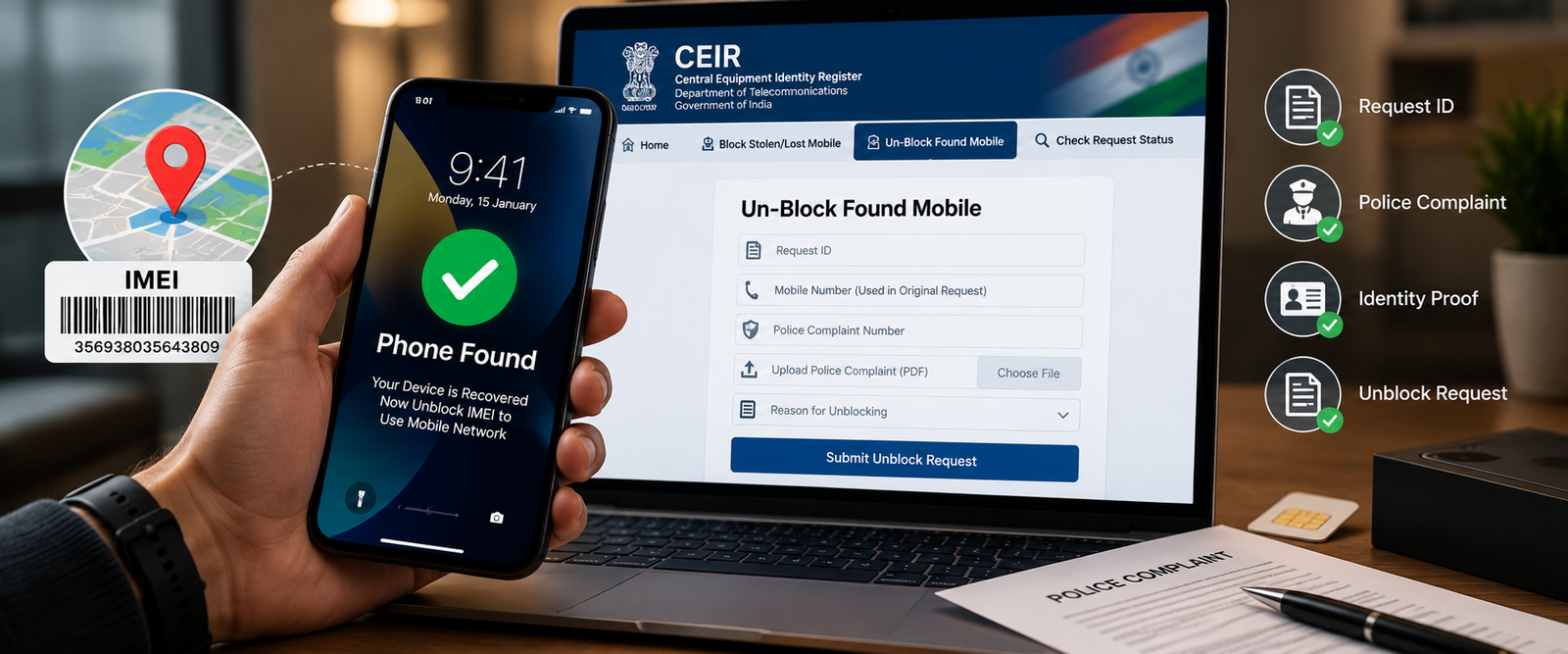
Finding a lost or stolen phone after reporting it can be a relief, but you may face another problem: your device might still be blocked from accessing Indian mobile networks. This often happens when you previously reported the phone through the Central Equipment Identity Register (CEIR) under the Department of Telecommunications.
If you have recovered your phone after IMEI blocking, you should submit an official unblocking request through the CEIR portal and follow the applicable verification process. Once the request has been processed, you can check whether the phone can connect to your mobile network again.
Many users search for ways to find device by IMEI, check their phone's status, or use an IMEI tracker after losing a device. However, locating a phone and removing an IMEI block are two different processes. An IMEI tracker may help with certain device-information checks, but a third-party tracking website cannot replace the official procedure for unblocking a phone in India.
This guide explains how to unblock a recovered phone, which documents you may need, and what to do if your device still has no network after the request.
How to Unblock Your IMEI After Finding Your Lost Phone
In India, the official CEIR portal provides an option called Un-Block Found Mobile for people who have recovered a previously blocked handset. You should use this official service rather than paying an unfamiliar website that claims it can remove an IMEI block instantly.
Step 1: Visit the official CEIR portal
Open the Government of India's CEIR website. On the homepage, look for the option labelled “Un-Block Found Mobile.”
Make sure you are using the official government website. Avoid entering your request details or OTP on an unfamiliar website claiming to offer the same service.
Step 2: Keep your original request ID ready
When you originally requested that your lost or stolen phone be blocked, CEIR generated a request ID. You will generally need this ID to identify your previous blocking request.
Check your saved confirmation, messages, or other records from the original application. If you cannot find the request ID, use the official Forgot Request ID option on the CEIR portal and follow the verification instructions.
Step 3: Enter the required information
The unblocking form asks for information associated with the original blocking request. Depending on the form and your situation, this includes:
The original CEIR request ID.
The mobile number provided during the blocking process.
Your police complaint number.
A copy of the police complaint.
The reason for unblocking the recovered phone.
The required OTP verification and CAPTCHA details.
Check every field carefully before proceeding. An incorrect request ID or incomplete complaint details can cause problems during submission.
Step 4: Complete OTP verification
The official form provides an OTP verification process. Enter the requested mobile number, obtain the OTP, and complete verification according to the instructions shown on the portal.
Never share your OTP with someone who contacts you claiming to be an IMEI tracking agent. You should enter it only on the legitimate service where you initiated the request.
Step 5: Submit the unblocking request
Review the information and submit your application. Save the acknowledgement or any reference details provided after submission.
Submitting a request does not necessarily mean that the IMEI has already been unblocked. You should check the request status and wait for the applicable process to be completed.
The current official form and its requirements are available through the CEIR unblocking service.
Step 6: Check whether your phone works normally
After the request has been processed, restart your device and check whether it connects to your mobile network.
Try making a call, sending a message, or using mobile data. If the phone still displays “No Service,” “Emergency Calls Only,” or another network error, do not immediately assume that your request has failed. The issue may require further status verification or assistance from your mobile operator.
Important distinction: Finding a phone is not the same as unblocking it
If you originally used a device-finding service or an IMEI-related service to locate information about your phone, remember that location services and network blocking serve different purposes.
An IMEI identifies a mobile device. It does not independently provide public access to live GPS coordinates, and a regular online IMEI tracker cannot authorize the removal of a government-recorded block. Use the appropriate official process for each task.
What Documents and Details Do You Need to Unblock a Phone?
Before submitting your application, prepare the information associated with your original lost-phone report. Having the correct details ready can make the process easier and reduce avoidable errors.
1. Original CEIR request ID
This identifies the request you submitted when reporting and blocking your lost phone. Keep it safe until the recovery process is complete.
If you have misplaced it, check the official CEIR website for the Forgot Request ID facility. The recovery process requires verification using information associated with your original application.
2. Mobile number used during the original request
The CEIR unblocking form asks for the mobile number provided for OTP or notifications during the blocking process.
Make sure you enter the correct number. If you no longer have access to it, follow the official portal's instructions or contact the CEIR helpdesk for guidance rather than trying to bypass verification.
3. Police complaint details
The official form requests the police complaint number and a copy of the complaint. Keep these details available when submitting your unblocking request.
If you reported the phone to the police, follow the relevant police station's instructions regarding the recovery and any required update to your complaint. Do not assume that recovering the handset automatically updates every record associated with the original report.
4. IMEI number and device information
Your phone's IMEI may be available on the original packaging, purchase invoice, or other device records. For a dual-SIM phone, there may be two IMEI numbers.
You can also check the IMEI displayed by the handset when it is accessible by dialling *#06#. Compare the displayed number with your original records, especially if the phone has multiple SIM slots.
Do not publish your complete IMEI in a public post or submit it to unrelated tracking websites.
5. A reason for unblocking
The CEIR form asks you to select a reason for unblocking and may request further details depending on your selection.
Choose the option that accurately describes how the phone was recovered. Do not provide false information just to make the request appear simpler.
A practical preparation checklist
Before opening the form, make sure you have:
The original CEIR request ID.
Access to the relevant mobile number for verification.
The police complaint number and complaint copy.
Your phone's IMEI and purchase details, if available.
Accurate information about how the phone was recovered.
A safe place to save the submission acknowledgement.
Not every supporting document listed here is necessarily requested as a separate upload in every situation. Follow the fields and instructions displayed by the official portal.
What if you lost your CEIR request ID?
Do not submit a completely new blocking request simply because you cannot find the original reference. First, visit the official portal and select “Forgot Request ID.”
The recovery page asks for the mobile number used during the blocking process, along with CAPTCHA and OTP verification. Follow the displayed steps to retrieve your request ID.
If the recovery option does not work, contact the official CEIR helpdesk at help-sancharsaathi@gov.in for assistance. Explain that you have recovered your phone and need help retrieving the original request details.
What If Your Phone Still Has No Network After Unblocking?
Completing an unblocking application does not guarantee that every network problem will disappear immediately. The request may still be under processing, or the phone may have a separate SIM, account, device, or network issue.
Use the following checks to identify the likely cause.
Check 1: Verify your CEIR request status
Return to the official CEIR portal and select “Check Request Status.” Use the relevant request ID or complaint details accepted by the form.
Confirm whether the request has been processed. If it is still pending, follow the instructions provided by the portal instead of repeatedly submitting duplicate applications.
Check 2: Restart your phone
After confirming that the request has been processed, restart your handset. Check whether the SIM is detected and whether the network indicator returns.
If the phone remains disconnected, move to an area with reliable cellular coverage and try again.
Check 3: Check the SIM card
A damaged, inactive, or incorrectly inserted SIM can prevent a phone from connecting to the network even when the IMEI is no longer blocked.
Try the following:
Confirm that the SIM is inserted correctly.
Check whether the SIM is active with your mobile operator.
If appropriate, test the SIM in another compatible phone.
Contact your operator if the SIM is not working or needs replacement.
If the SIM works in another device, the problem may be related to your handset or its network settings rather than the SIM itself.
Check 4: Confirm that the correct IMEI was unblocked
Dual-SIM devices may have separate IMEI numbers for their cellular interfaces. Check your phone's records and the original blocking request to ensure that the relevant device identifier was included.
If you are uncertain whether the correct IMEI was addressed, contact CEIR support or the relevant authorities for clarification. Do not attempt to alter the device identifier yourself.
Check 5: Contact your mobile network operator
If the request is complete but the phone still cannot connect, contact your operator's customer support. Ask them to check the SIM status, account restrictions, network availability, and any remaining device-related restrictions.
Provide the request reference and proof of ownership if requested through an appropriate support channel.
Check 6: Contact the CEIR helpdesk if the block appears unresolved
If your operator confirms that the problem may involve the IMEI block, contact the CEIR helpdesk at help-sancharsaathi@gov.in or use the official portal's support information.
Include your request reference, a clear explanation of the problem, and the relevant status details. Avoid sending unnecessary sensitive information in an unsecured email.
Can an online IMEI tracker free tool unblock your phone?
No ordinary public tracking tool should be treated as an authorized substitute for the CEIR unblocking process. Some services can provide limited device details or IMEI-related checks, depending on their data sources, but these functions are not equivalent to changing an official blocking status.
If your goal is to find device by IMEI, understand what information a service can legitimately provide before using it. If your phone has already been recovered and blocked through CEIR, focus on the official unblocking procedure rather than paying a third party that promises guaranteed results.
Frequently Asked Questions
Can I unblock my IMEI online in India?
Yes. The official CEIR portal provides an online “Un-Block Found Mobile” service for recovered handsets. You must provide the information and verification required by the form.
How long does it take to unblock a recovered phone?
Processing time can vary. Check the official request status and follow any instructions provided. Do not rely on an unofficial website promising a guaranteed processing time.
Can I unblock my phone without the original request ID?
If you have lost the ID, use the official CEIR “Forgot Request ID” service first. If you cannot retrieve it, contact the helpdesk for guidance.
Will changing my SIM remove an IMEI block?
No. Replacing a SIM does not itself remove an IMEI-level restriction. You should complete the official unblocking process and confirm the status.
Can an IMEI tracker locate my recovered phone?
An IMEI identifies the device, but an ordinary public IMEI tracker cannot independently provide guaranteed live GPS location. Use legitimate device-finding services for location features and CEIR for official blocking or unblocking requests.
What should I do if the phone still does not work after unblocking?
Check the CEIR request status, restart the handset, verify the SIM, and contact your mobile operator. If the IMEI restriction appears unresolved, contact CEIR support.
Conclusion
Recovering a lost phone is only part of the process if you previously requested IMEI blocking. To restore normal network access, use the official CEIR “Un-Block Found Mobile” service, provide the required request and police complaint details, complete OTP verification, and monitor the request status.
If the phone still has no network after the request is processed, investigate SIM and network problems before assuming that the IMEI remains blocked. Contact your operator or the CEIR helpdesk when necessary.
For anyone searching for ways to find device by IMEI, an IMEI tracker, or an online IMEI tracker free service, the most important point is to use the right tool for the right task. Device identification, location finding, and official IMEI unblocking are separate functions. Understanding that difference helps you recover your phone safely and avoid misleading tracking claims.


Leave a Reply
Your email address will not be published. Comments are reviewed before they appear.